
How to log in an ArcGIS Online account in the Tygron Client Application
How to log in an ArcGIS Online account in the Tygron Client Application:
- Click on the Community tab and click on Sign in with ArcGIS
- In the new panel that pops up, choose Default ArcGIS Online and click on Continue to login
- Fill in your username and password
If successful, the message "logged in with account: <your accountname>" will be displayed and the panel will be closed automatically. You are now logged in with your ArcGIS Login. - To add your private or organization own data, see the how to access your data steps below.
-
 Sign in with ArcGIS link in Community Tab of the ribbon bar.
 -
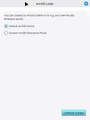 Arcgis default Login panel
 -
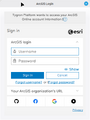 Arcgis Sign in panel.
 -
 Link changed when logged in with Arcgis.


