
How to disable Tree placements from default Sources on Project creation
How to disable Tree placements from default Sources on Project creation:
- Start the Tygron client application and log in
- Select "New project" in the start menu
- Provide a name and configure additional options
- Click on Create new Project
- In the Area Selection Step, click on the link Advanced Options
- Select the tab named "general"
- Uncheck the option named "Default Trees from various Sources"
-
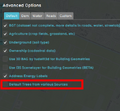 Uncheck the option named "Default Trees from various Sources"
